Friday, 27 March 2015

crontab: error on previous line; number out of bounds


Today I need to comment out a line in crontab in order to do a depolyment.
After I changed crontab, I found I could't save the crontab with error message:

30 4 * * 7 /usr/bin/rm /opt/SUNWexplo/output/*gz ; /opt/SUNWexplo/bin/explorer -d /etc/opt/SUNWexplo/default/explorer
crontab: error on previous line; number out of bounds.

crontab: errors detected in input, no crontab file generated.


Something is wrong with 30 4 * * 7,  the last number means weeks, you can choose a number from 0-6 , 7 is out of bounds.
I guess the guy modified crontab file directly instead of crontab -e and made a mistake.

I changed 7 to 0 and issue fixed.

TNS-12542: TNS:address already in use TNS-12560: TNS:protocol adapter error TNS-00512: Address already in use 32/64-bit Windows Error: 48: Unknown error


c:> sqlplus / as sysdba
 as NO TNS or listener FOUND

c:> exit

Lsnrctl start PROD 

TNSLSNR for 32-bit Windows: Version 10.2.0.3.0 - Production
System parameter file is
D:\oracle\PROD\db\tech_st\10.2.0\network\admin\PROD_erpprod\listener.ora
Log messages written to
D:\oracle\PROD\db\tech_st\10.2.0\network\log\listener.log
Error listening on: (ADDRESS=(PROTOCOL=tcp)(HOST=)(PORT=1521))
TNS-12542: TNS:address already in use
 TNS-12560: TNS:protocol adapter error
  TNS-00512: Address already in use
   32-bit Windows Error: 48: Unknown error

Listener failed to start. See the error message(s) above...


For this error we did the followings

HKEY_LOCAL_MACHINE --> SYSTEM --> Services --> TCPIP ---> Parameters -->
Create one Key file name as MaxUserPort and Value as 65534 save it .


And then we  gave ipaddress instead of hostname in listener.ora file .


Now start the Listener  as Lsnrctl   start PROD


Now i try to connect the DB as sqlplus / as sysdba  and it  startup as MOUNT stage so  we try to OPEN now its open with out an issue. 

OPATCH FAILED WITH ERROR CODE 73


SQL> select name,open_mode from v$database;

NAME      OPEN_MODE
--------- --------------------
DOYEYDB  READ WRITE

SQL> shut immediate;
Database closed.
Database dismounted.
ORACLE instance shut down.
SQL> exit


==>ls -tlr
total 94688
drwxrwxr-x 15 oracle oinstall     4096 Dec 10 01:42 19769496
-rw-rw-r--  1 oracle oinstall    93056 Jan 20 09:52 PatchSearch.xml
-rw-r--r--  1 oracle oinstall 96857392 Feb 24 12:57 p19769496_112030_Linux-x86-64.zip

==>cd 19769496/

dbcpblkdev01*DOYENDB-/home/oracle/Patches/19769496
==>ls -trlr
total 112
drwxrwxr-x 4 oracle oinstall  4096 Dec 10 01:41 18522512
drwxrwxr-x 4 oracle oinstall  4096 Dec 10 01:41 16902043
drwxrwxr-x 4 oracle oinstall  4096 Dec 10 01:41 14275605
drwxrwxr-x 4 oracle oinstall  4096 Dec 10 01:41 16619892
drwxrwxr-x 4 oracle oinstall  4096 Dec 10 01:41 13696216
drwxrwxr-x 5 oracle oinstall  4096 Dec 10 01:41 17540582
drwxrwxr-x 4 oracle oinstall  4096 Dec 10 01:41 13923374
drwxrwxr-x 4 oracle oinstall  4096 Dec 10 01:41 16056266
drwxrwxr-x 4 oracle oinstall  4096 Dec 10 01:41 18031683
drwxrwxr-x 4 oracle oinstall  4096 Dec 10 01:41 19121548
drwxrwxr-x 4 oracle oinstall  4096 Dec 10 01:41 19769496
drwxr-xr-x 4 oracle oinstall  4096 Dec 10 01:41 13343438
drwxrwxr-x 5 oracle oinstall  4096 Dec 10 01:41 14727310
-rw-r--r-- 1 oracle oinstall    21 Dec 10 01:41 README.txt
-rw-r--r-- 1 oracle oinstall  2872 Dec 10 01:42 patchmd.xml
-rw-rw-r-- 1 oracle oinstall 51692 Jan 17 11:30 README.html


PreCheck:

==>opatch prereq CheckConflictAgainstOHWithDetail -ph ./
Oracle Interim Patch Installer version 11.2.0.3.0
Copyright (c) 2012, Oracle Corporation.  All rights reserved.

PREREQ session

Oracle Home       : /u01/oracle/app/oracle/product/DOYENDB/11.2.3
Central Inventory : /u01/oracle/oraInventory
   from           : /u01/oracle/app/oracle/product/DOYENDB/11.2.3/oraInst.loc
OPatch version    : 11.2.0.3.0
OUI version       : 11.2.0.3.0
Log file location : /u01/oracle/app/oracle/product/DOYENDB/11.2.3/cfgtoollogs/opatch/opatch2015-02-24_13-14-48PM_1.log

Invoking prereq "checkconflictagainstohwithdetail"

Prereq "checkConflictAgainstOHWithDetail" passed.

OPatch succeeded.

dbcpblkdev01*DOYENDB-/home/oracle/Patches/19769496/19769496

==>opatch apply
Oracle Interim Patch Installer version 11.2.0.3.0
Copyright (c) 2012, Oracle Corporation.  All rights reserved.


Oracle Home       : /u01/oracle/app/oracle/product/DOYENDB/11.2.3
Central Inventory : /u01/oracle/oraInventory
   from           : /u01/oracle/app/oracle/product/DOYENDB/11.2.3/oraInst.loc
OPatch version    : 11.2.0.3.0
OUI version       : 11.2.0.3.0
Log file location : /u01/oracle/app/oracle/product/DOYENDB/11.2.3/cfgtoollogs/opatch/opatch2015-02-24_13-16-53PM_1.log

Verifying environment and performing prerequisite checks...
UtilSession failed: null
Log file location: /u01/oracle/app/oracle/product/DOYENDB/11.2.3/cfgtoollogs/opatch/opatch2015-02-24_13-16-53PM_1.log


OPatch failed with error code 73

dbcpblkdev01*DOYENDB-/home/oracle/Patches/19769496

Error:

OPatch failed with error code 73


Solution:


cd /u01/oracle/app/oracle/product/DOYENDB/11.2.3

mv Opatch Opatch_bak

unzip p6880880_112000_Linux-x86-64.zip


cd Patches/19769496

opatch prereq CheckConflictAgainstOHWithDetail -ph ./
Oracle Interim Patch Installer version 11.2.0.3.6
Copyright (c) 2013, Oracle Corporation.  All rights reserved.

PREREQ session

Oracle Home       : /u01/oracle/app/oracle/product/DOYENDB/11.2.3
Central Inventory : /u01/oracle/oraInventory
   from           : /u01/oracle/app/oracle/product/DOYENDB/11.2.3/oraInst.loc
OPatch version    : 11.2.0.3.6
OUI version       : 11.2.0.3.0
Log file location : /u01/oracle/app/oracle/product/DOYENDB/11.2.3/cfgtoollogs/opatch/opatch2015-02-24_15-51-36PM_1.log

Invoking prereq "checkconflictagainstohwithdetail"

Prereq "checkConflictAgainstOHWithDetail" passed.

OPatch succeeded.

==>opatch apply
Oracle Interim Patch Installer version 11.2.0.3.6
Copyright (c) 2013, Oracle Corporation.  All rights reserved.


Oracle Home       : /u01/oracle/app/oracle/product/DOYENDB/11.2.3
Central Inventory : /u01/oracle/oraInventory
   from           : /u01/oracle/app/oracle/product/DOYENDB/11.2.3/oraInst.loc
OPatch version    : 11.2.0.3.6
OUI version       : 11.2.0.3.0
Log file location : /u01/oracle/app/oracle/product/DOYENDB/11.2.3/cfgtoollogs/opatch/opatch2015-02-24_15-52-26PM_1.log

Verifying environment and performing prerequisite checks...
OPatch continues with these patches:   19121548  19769496

Do you want to proceed? [y|n]
Y
User Responded with: Y
All checks passed.

Please shutdown Oracle instances running out of this ORACLE_HOME on the local system.
(Oracle Home = '/u01/oracle/app/oracle/product/DOYENDB/11.2.3')


Is the local system ready for patching? [y|n]
y
User Responded with: Y
Backing up files...
Applying sub-patch '19121548' to OH '/u01/oracle/app/oracle/product/DOYENDB/11.2.3'

Patching component oracle.sysman.console.db, 11.2.0.3.0...

Patching component oracle.rdbms.rsf, 11.2.0.3.0...

Patching component oracle.rdbms.rman, 11.2.0.3.0...

Patching component oracle.rdbms, 11.2.0.3.0...

Patching component oracle.rdbms.dbscripts, 11.2.0.3.0...

Patching component oracle.ordim.client, 11.2.0.3.0...

Patching component oracle.ordim.jai, 11.2.0.3.0...

Verifying the update...
Applying sub-patch '19769496' to OH '/u01/oracle/app/oracle/product/DOYENDB/11.2.3'

Patching component oracle.sysman.agent, 10.2.0.4.3...

Patching component oracle.ovm, 11.2.0.3.0...

Patching component oracle.xdk, 11.2.0.3.0...

Patching component oracle.rdbms.util, 11.2.0.3.0...

Patching component oracle.rdbms, 11.2.0.3.0...

Patching component oracle.rdbms.dbscripts, 11.2.0.3.0...

Patching component oracle.xdk.parser.java, 11.2.0.3.0...

Patching component oracle.oraolap, 11.2.0.3.0...

Patching component oracle.rdbms.rsf, 11.2.0.3.0...

Patching component oracle.xdk.rsf, 11.2.0.3.0...

Verifying the update...

OPatch found the word "warning" in the stderr of the make command.
Please look at this stderr. You can re-run this make command.
Stderr output:
ins_emagent.mk:113: warning: overriding commands for target `nmosudo'
ins_emagent.mk:52: warning: ignoring old commands for target `nmosudo'
/u01/oracle/app/oracle/product/DOYENDB/11.2.3/sysman/lib/ins_emagent.mk:113: warning: overriding commands for target `nmosudo'
/u01/oracle/app/oracle/product/DOYENDB/11.2.3/sysman/lib/ins_emagent.mk:52: warning: ignoring old commands for target `nmosudo'


Composite patch 19769496 successfully applied.
OPatch Session completed with warnings.
Log file location: /u01/oracle/app/oracle/product/DOYENDB/11.2.3/cfgtoollogs/opatch/opatch2015-02-24_15-52-26PM_1.log

OPatch completed with warnings.

dbcpblkdev01*DOYENDB-/home/oracle/Patches/19769496


Friday, 6 June 2014

Cluster verify utility fails with the user eqivelence test

Cluster verify utility fails with the user eqivelence test PRVF-4007 : User equivalence check failed for user "grid" 

 ./runcluvfy.sh stage -pre crsinst -fixup -n racinst1.doyensys.com,racinst2.doyensys.com -verbose

Performing pre-checks for cluster services setup

Checking node reachability...

Check: Node reachability from node "Rac1"
  Destination Node                      Reachable?
  ------------------------------------  ------------------------
racinst2                               yes

racinst1                              yes


Result: Node reachability check passed from node "rac1"


Checking user equivalence...

Check: User equivalence for user "grid"
  Node Name                             Comment
  ------------------------------------  ------------------------
  racinst1                               failed
  racinst2                             failed
Result: PRVF-4007 : User equivalence check failed for user "grid"

ERROR:
User equivalence unavailable on all the specified nodes
Verification cannot proceed


Pre-check for cluster services setup was unsuccessful on all the nodes.

Fix:
Say you have two nodes, racinst1 and racinst2 and user oracle. You have created the ssh keys in oracle on both nodes.

On node: rac1

ssh racinst1
ssh racinst1.doyensys.com  
ssh racinst2
ssh racinst2.doyensys.com  
ssh racinst1-priv
ssh racinst2-priv
exec /usr/bin/ssh-agent $SHELL
/usr/bin/ssh-add

On node: rac2

ssh racinst1
ssh racinst1.doyensys.com  
ssh racinst2
ssh racinst2.doyensys.com  
ssh racinst1-priv
ssh racinst2-priv
exec /usr/bin/ssh-agent $SHELL
/usr/bin/ssh-add

Issue was fixed
 

Monday, 19 May 2014

Installation of 11gR2 Rac on RHEL using VMware and Openfiler


Oracle RAC Architecture 
A general pictorial guide for how to the install RHEL 5.4 for Oracle RAC can be found here


Hostname & IP Requirement
Machine
Public IP
Private IP
VIP 
Storage IP
RAC Node1
192.168.1.16
192.168.0.21
192.168.1.21
192.168.1.15
(openfilersan.doyensys.com)
RAC Node2
192.168.1.17
192.168.0.22
192.168.1.22
192.168.1.15
(openfilersan.doyensys.com)


Machine
Public Name
Private  Name
VIP Name
RAC Node1
racinst1.doyensys.com
racinst1-prv
racinst1-vip.doyensys.com
RAC Node2
racinst2.doyensys.com
Racinst2-prv
racinst2-vip.doyensys.com


SCAN IP Address for RAC


192.168.1.27    racinst-scan.doyensys.com       racinst-scan
192.168.1.28    racinst-scan.doyensys.com       racinst-scan
192.168.1.29    racinst-scan.doyensys.com       racinst-scan


Add /etc/hosts entry for node 1


Add /etc/hosts entry for node2


Install the following RPM on both nodes
yum install -y  binutils-2.*
yum install -y  compat-libstdc++-33*
yum install -y  elfutils-libelf-0.*
yum install -y  elfutils-libelf-devel-*
yum install -y  gcc-4.*
yum install -y  gcc-c++-4.*
yum install -y  glibc-2.*
yum install -y  glibc-common-2.*
yum install -y  glibc-devel-2.*
yum install -y  glibc-headers-2.*
yum install -y  ksh-2*
yum install -y  libaio-0.*
yum install -y  libaio-devel-0.*
yum install -y  libgcc-4.*
yum install -y  libstdc++-4.*
yum install -y  libstdc++-devel-4.*
yum install -y  make-3.*
yum install -y  sysstat-7.*
yum install -y  unixODBC-2.*
yum install -y  unixODBC-devel-2.*


Change the Kernel Parameters
Add or amend the following lines to the "/etc/sysctl.conf" file.
 fs.aio-max-nr = 1048576
fs.file-max = 6815744
kernel.shmall = 2097152
kernel.shmmax = 1054504960
kernel.shmmni = 4096
# semaphores: semmsl, semmns, semopm, semmni
kernel.sem = 250 32000 100 128
net.ipv4.ip_local_port_range = 9000 65500
net.core.rmem_default=262144
net.core.rmem_max=4194304
net.core.wmem_default=262144
net.core.wmem_max=1048586

Run the following command to change the current kernel parameters.
#/sbin/sysctl -p

Add the following lines to the "/etc/security/limits.conf" file.

oracle               soft    nproc   2047
oracle               hard    nproc   16384
oracle               soft    nofile  1024
oracle               hard    nofile  65536
 
Add the following lines to the "/etc/pam.d/login" file, if it does not already exist.
session    required     pam_limits.so

Change the setting of SELinux to permissive by editing the "/etc/selinux/config" file, making sure the SELINUX flag is set as follows.
SELINUX=permissive
 Check the firewall service is running or not .
# service iptables stop
# chkconfig iptables off
 
 
Either configure NTP, or make sure it is not configured so the Oracle Cluster Time Synchronization Service (ctssd) can synchronize the times of the RAC nodes. If you want to deconfigure NTP do the following.
# service ntpd stop
Shutting down ntpd:                                        [  OK  ]
# chkconfig ntpd off
# mv /etc/ntp.conf /etc/ntp.conf.orig
# rm /var/run/ntpd.pid
If you want to use NTP, you must add the "-x" option into the following line in the "/etc/sysconfig/ntpd" file.
OPTIONS="-x -u ntp:ntp -p /var/run/ntpd.pid"
Then restart NTP.
# service ntpd restart

Create User and Groups for oracle


Create the directories on both nodes in which the Oracle software will be installed.
mkdir -p  /u01/app/11.2.0/grid
mkdir -p /u01/app/oracle/product/11.2.0/db_1
chown -R oracle:oinstall /u01
chmod -R 775 /u01/


Create Environment file on both nodes

Create a file called "/home/oracle/db_env" with the following contents.

 Create a file called "/home/oracle/grid_env" with the following contents.

Install the following package from the Oracle grid media after you've defined groups.
#cd /u01/Soft/grid/rpm
#rpm -Uvh cvuqdisk*

Create  Disks for RAC installation

A general pictorial guide for how to install and configure SAN for RAC using OPENFILER


Internal Storage Details

Mount Point
Capacity
Node1
Node 2
/ root
20
20
/ swap
4 GB
4 GB


External Storage Details


Type
Size
LUNs Qty.
Voting disk


OCR
6
3
Flash back recovery
50
1
DATA
100
1


Installation of Oracle ASM 

Instance 1:


Determine your current kernel version by using uname -r 


 We have 2.6.18-164 so have to download the appropriate ASMLib RPMs from  Link

Node 1:
 

Node 2:
 Configure the iSCSI (initiator) service
Now that the iSCSI service is started, use the iscsiadm command-line interface to discover all available targets on the network storage server. This should be performed on both Oracle RAC nodes to verify the configuration is functioning properly:

Manually Log In to iSCSI Targets
At this point the iSCSI initiator service has been started and each of the Oracle RAC nodes were able to discover the available targets from the network storage server. The next step is to manually log in to each of the available targets which can be done using the iscsiadm command-line interface. This needs to be run on both Oracle RAC nodes. Note that I had to specify the IP address and not the host name of the network storage server ( openfiler1-priv) - I believe this is required given the discovery (above) shows the targets using the IP address.


Configure Automatic Log In
The next step is to ensure the client will automatically log in to each of the targets listed above when the machine is booted (or the iSCSI initiator service is started/restarted). As with the manual log in process described above, perform the following on both Oracle RAC nodes:

(cd /dev/disk/by-path; ls -l *openfiler* | awk '{FS=" "; print $9 " " $10 " " $11}')

 Follow the same steps to discover the disk on second node


 Follow the steps to partion  the Disks using fdisk


Setting SSH for Grid Installation


  Go to gridsoftware location cd /u01/Soft/grid/sshsetup/  and run the following command.
 ./sshUserSetup.sh -user oracle -hosts "racinst1 racinst2" -advanced -exverify -confirm

 Testcase from Node1:

 Test case from Node 2:

  Configure ASM on Node1 


 Node 2:


Run runcluvfy.sh by following command 
 ./runcluvfy.sh stage -pre crsinst -n racinst1,racinst2 -r 11gR2 -verbose

Grid Installation:


After Complted the installation check the cluster status on both nodes


Here the oc4j service is faild to start oc4j give the bellow mention command


ASMCA Configuration:


Database Home Installation:


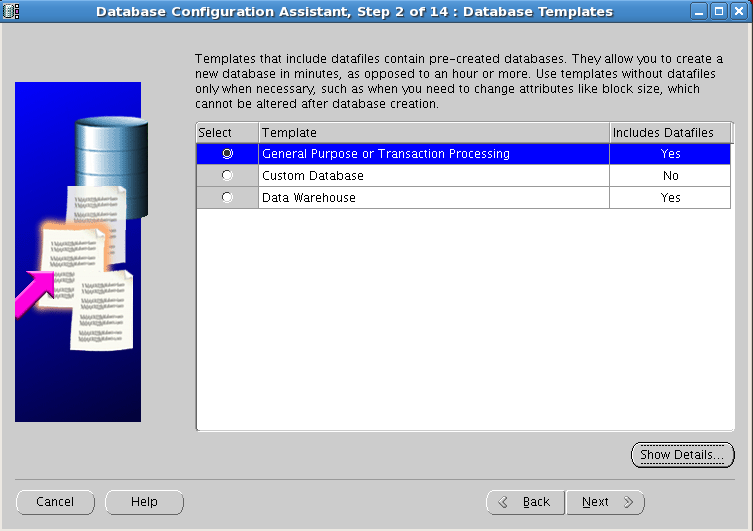
Create Database using dbca:


Remove the check mark “Enable automatic maintenance tasks”


Click on Yes button

Check whether DATA disk group is running on RAC Instances, if it is not running then start.


Update File Size as 1024 M Byes for all Redo Log


 Click exit to complete the installation

RAC instance status check:

 Node1:


 Node2:
 Node1: